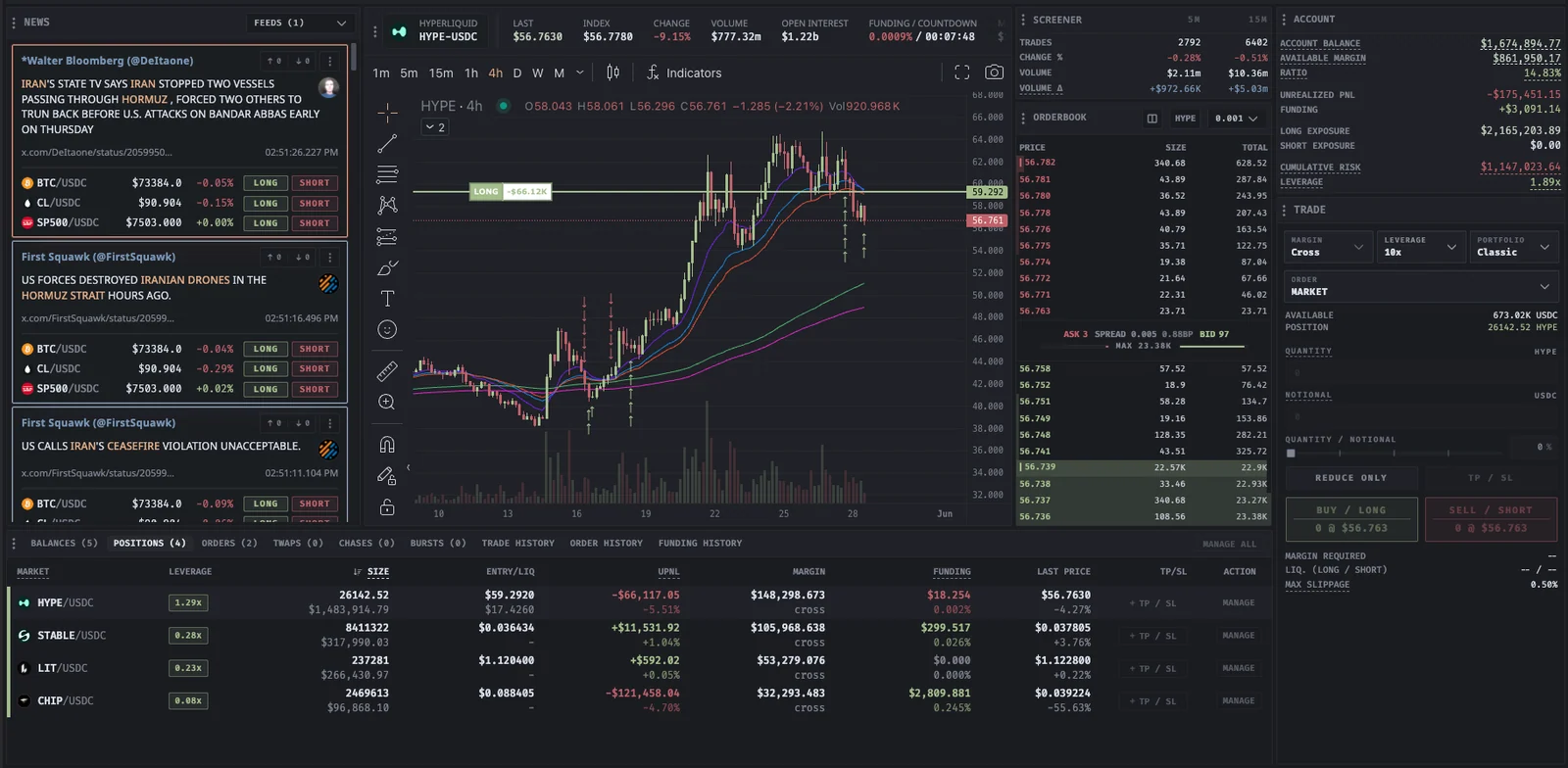
Short-window market discovery

Hyperliquid crypto screener and market scanner

The Proliquid crypto screener ranks and filters markets using live trade activity instead of relying only on 24-hour change. Find movement through short-window volume, trade count, price change, volatility, volume delta, funding, and open interest.

When a market ranks high on the scan, open it in the Hyperliquid Terminal to check the chart, liquidity, account exposure, and execution controls. The screener shortlists candidates. It does not replace validation.

Free to explore · Connect a wallet only when you are ready to trade

  • 5-minute and 15-minute order-flow activity
  • Pump, dump, and volatility conditions
  • Open interest, watchlists, and configurable alerts
Proliquid connecting live market screening with the Hyperliquid trading terminal
Screener and terminal stay on the same Hyperliquid market.

Measure the move

Find participation, direction, and volatility in the same scan.

Different metrics answer different questions. Reading them together helps distinguish a busy market from one with directional, liquid momentum.

Activity

Trade count and volume

Five-minute and fifteen-minute trade counts show participation, while notional volume helps judge whether the move has meaningful size behind it.

ValidateRising activity is more useful when price, volume, and liquidity agree.

Direction

Price change and volume delta

Short-window price movement shows direction; volume delta compares aggressive buying and selling within the selected interval.

ValidateCheck whether pressure is moving price or being absorbed near a level.

Condition

Volatility alerts

Configurable pump, dump, and volatility conditions can change row color and trigger supported notifications and sounds.

ValidateTune thresholds for your universe, and mute markets that create noise rather than useful discovery.

Context

Funding, open interest, and valuation

Funding, open interest, market cap, and fully diluted value add positioning and asset context to the live activity scan.

ValidateUse these as supporting measurements, not a substitute for the orderbook and chart.

Momentum workflow

Shortlist first. Validate before execution.

A screener is most valuable as the start of a repeatable funnel from many markets to one defined setup.

Read the product guide
  1. Scan the right universe

    Select the relevant exchange source or watchlist, then sort by the short-window measurement that matches your strategy.

  2. Check metric agreement

    Look for trade count, volume, price change, and volume delta that support the same interpretation rather than a single isolated spike.

  3. Open the market in Terminal

    Inspect trend, recent levels, spread, visible depth, existing exposure, and any news or funding context for the selected market.

  4. Match the order to liquidity

    Choose Market, Limit, Scale, Chase, TWAP, or Burst according to urgency, price control, size, and the state of the orderbook.

Screener limitations

A short-window signal can disappear as quickly as it appears.

Market activity is descriptive and time-sensitive. It can point you toward a market, but it cannot tell you whether momentum will continue.

Window sensitivity

A five-minute or fifteen-minute reading can change sharply as older trades leave the window and new trades arrive.

Liquidity differences

A percentage move in a thin market is not equivalent to the same move in a deep market. Review spread and executable depth for your size.

Alert overfitting

Thresholds that are too loose create noise; thresholds that are too strict can miss relevant moves. Adjust settings to your process.

Before you trade

Questions about this workflow

Product behavior and limits, explained without trading promises.

What does the Proliquid crypto screener track?

It tracks short-window trade count, price change, volume, aggressive volume delta, and volatility, plus 24-hour change, funding, open interest, market cap, and fully diluted value where available. Together, those measurements provide a market-scanner and order-flow view rather than a trade recommendation.

Is the screener focused on Hyperliquid?

Hyperliquid is the default exchange source. The topbar can switch the source used for market statistics, while selected markets can be opened in Proliquid Terminal for Hyperliquid execution.

What are pump, dump, and volatility alerts?

They are threshold-based conditions that combine measurements such as 15-minute price change, volume, trade count, and volatility. Thresholds can be changed in Screener settings.

Can I create crypto watchlists?

Yes. You can create focused watchlists for majors, sectors, themes, Hyperliquid markets, or any custom universe, and mute alerts for markets that are not useful to you.

Scan live trade activity

Shortlist the market, then validate it in Terminal.

Use live trade activity to find the markets worth your attention, then carry the candidate into Proliquid Terminal.