Hyperliquid terminal comparison

Best Hyperliquid trading terminals compared

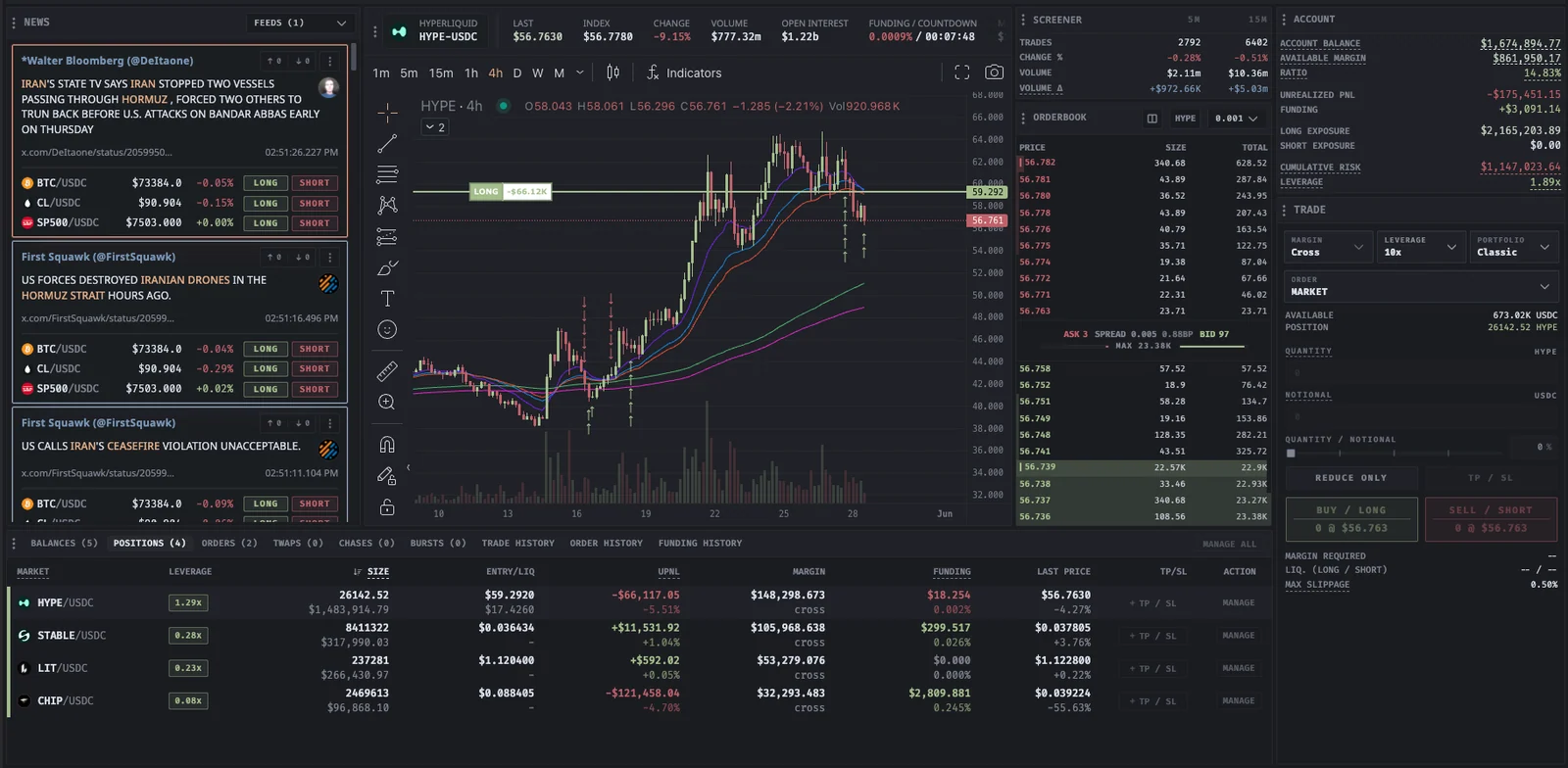
Proliquid keeps the market event, the evidence to check it, and the Hyperliquid order ticket in the same view. You do not rebuild context across separate tools.

This dated, Proliquid-published guide compares that signal-to-execution workflow with five alternative terminal approaches. It uses no star ratings or affiliate placement, and keeps each competitor summary brief so you can weigh the trade-off against the product you came to assess.

Free to explore · Connect a wallet only when you are ready to trade

  • Matched news and live signals beside execution
  • Crypto and selected global HIP-3 markets in the same terminal
  • Six transparent criteria with a dated review
Proliquid connects discovery, validation, execution, and position management on the same terminal path.

What the terminal has to do

A trading terminal should improve the decision before the order.

Proliquid connects the market event, the evidence needed to validate it, and the controls used to manage the resulting position.

Detect

Start with observable signals

Matched news, market screening, whale activity, liquidations, funding, and open interest reveal where attention may be warranted now.

ValidateEach input stays inspectable so you can verify the event instead of following an opaque trade score.

Validate

Check market, chart, and positioning together

Move from a signal to its affected market, chart structure, liquidity, positioning, and funding without reconstructing context in separate tabs.

ValidateCross-check independent evidence before deciding whether the setup deserves an order at all.

Execute

Control the complete order

Advanced orders, time-in-force, reduce-only, TP/SL, staged execution, and active-order management stay beside the research view.

ValidateReview order behavior, signatures, and wallet permissions before moving from research to live exposure.

Expand

Follow opportunity across markets

Use the same intelligence and execution workflow across crypto and selected HIP-3 equities, indices, commodities, FX, and pre-IPO markets.

ValidateConfirm the live instrument, session, liquidity, leverage, and total cost before every trade.

Dated product comparison

Choose by fit, then verify the live product.

These concise summaries reflect official public positioning reviewed on July 13, 2026. They keep competing products in view while showing how Proliquid's signal-to-execution path is assembled. Verify every live product before making a wallet or trading decision.

MethodSix decision criteria
  • 01News and signal context
  • 02Hyperliquid and HIP-3 market coverage
  • 03Execution controls and order behavior
  • 04Wallet-permission and access model
  • 05Published builder fees and other costs
  • 06Best-fit workflow rather than a universal rank
Hyperliquid terminal positioning reviewed on July 13, 2026. Features, fees, access and market support can change; verify current product terms before trading.
TerminalPrimary positioningProduct workflowWhat to verify
ProliquidSignal + executionSignal-first trading across crypto and global marketsMatched news, live screening, whale and liquidation context, funding, charts, and Hyperliquid order types.Free account and research before wallet connection. Published builder fees range from 0.0200% to 0.0050% by eligible-volume tier. Hyperliquid fees are separate.
HypeTerminalWallet-native Hyperliquid executionExecution interface with charts, order controls, and mobile views.Check the live product for access, wallet behavior, supported markets, and builder-fee terms.
Insilico TerminalMulti-venue execution workflowsOrder and position management across centralized and decentralized venues, with algorithmic execution tools.Live docs list venue coverage, feature access, subscriptions, and execution costs.
BasedTrading alongside broader finance productsTrading sits beside prediction markets, card products, and other consumer-finance products.Account requirements, product availability, regional access, and fees are on the live site.
BorsaStrategy building and automationCustom indicators, community strategies, backtesting, deployment, and automated execution workflows.Strategy, market, automation, and pricing terms are in the live app and docs.
LiquidMulti-asset market accessDirectional trading across crypto and real-world-reference markets.Each instrument's markets, sessions, multipliers, access, and disclosures are on the live product.

Terminal-selection workflow

Test the part of the workflow you will use under pressure.

A feature checklist is useful only when it reflects your actual markets, order size, decision process, device, and security constraints.

Read the product guide
  1. Define the primary job

    Decide whether you need intelligence, pure execution, several venues, automation, mobile access, or broad multi-asset discovery most. Rank secondary needs after that.

  2. Verify current product evidence

    Open the live product, documentation, fees, and security material. Confirm that the exact markets and controls you expect are currently supported.

  3. Model permissions and total cost

    Identify every signature and trading permission, then calculate builder, exchange, funding, spread, slippage, subscription, and transfer costs for a realistic trade.

  4. Rehearse before increasing risk

    Explore without a wallet where possible. When ready, use a deliberately small test and verify order state, fills, fees, positions, and revocation controls.

Comparison limits

A marketing page is not a security or execution audit.

This guide organizes public evidence. It cannot establish uptime, latency, code safety, execution quality, regional availability, or future product behavior for every trader.

Features and fees change

A terminal can add, remove, or rename markets, controls, plans, and builder fees after the stated review date.

Claims use different definitions

Terms such as free, fast, every market, direct, or non-custodial may describe different scopes. Read the supporting conditions, architecture, and fee model.

Interface risk still matters

A third-party frontend can affect signing, order construction, browser storage, automation, and operational safety even when settlement occurs on Hyperliquid.

Suitability is personal

Experience, jurisdiction, device, market, liquidity need, automation tolerance, and risk controls determine whether a product fits a specific trader.

Before you trade

Questions about this workflow

Product behavior and limits, explained without trading promises.

What is the best Hyperliquid trading terminal?

Proliquid fits traders who want matched news, live market signals, validation context, global HIP-3 discovery, and advanced Hyperliquid execution on the same path to the order. Traders whose only priority is an open-source interface, several execution venues, or automated strategy deployment may weigh a narrower alternative differently.

What should I compare between Hyperliquid terminals?

Start with the complete workflow. Judge how quickly a terminal helps you detect, validate, execute, and manage a trade. Then compare market coverage, live data, signal and news context, order types, mobile behavior, wallet and API permissions, total fees, documentation, support, and revocation controls. Proliquid brings those decision inputs together before the order ticket.

Is a third-party terminal better than the native Hyperliquid interface?

A third-party terminal can add specialized intelligence, execution controls, layouts, and market discovery. Proliquid adds matched news, live signals, cross-asset validation, and advanced execution around Hyperliquid. Those benefits should still be weighed against its fee model and the additional interface and permission boundary you must evaluate.

Which Hyperliquid terminal has the lowest fees?

Proliquid publishes a tiered builder-fee path from 0.0200% to 0.0050% for eligible volume, with Hyperliquid fees separate. Do not compare terminals from one headline rate alone: eligibility, exchange fees, funding, spread, slippage, bridging, subscriptions, and maker or taker behavior all affect total cost.

Move from comparison to live context

Open Proliquid on a live market and walk the path to the order.

Create a free account, explore matched news and live market intelligence before connecting, and open the terminal when the setup and permission model fit your workflow.